

 Doc Summary

When purchasing a domain through ProRedLine (Domain Manager), you will be asked how you want to use your domain.
This setting is called Domain Usage and determines how your domain is technically connected, not how it is billed.
Understanding this choice is important to ensure your domain works exactly as you expect.
What is Domain Usage? #
Domain Usage defines how your domain interacts with an existing web hosting subscription (if any).
Key points to understand first:
- Billing is always separate
Domain Manager is always its own subscription, regardless of how the domain is used. - Domain Usage only affects technical setup, such as DNS routing and hosting configuration.
- You can change the Domain Usage later if your situation changes.
The Three Domain Usage Options #
1. Standalone Domain (DNS Only) #
Best for:
- Domains without web hosting
- External hosting providers
- Custom DNS setups
What this means:
- The domain is not connected to any ProRedLine web hosting subscription.
- You receive full DNS management.
- No website or email hosting is automatically linked.
Typical use cases:
- Using the domain with a third-party hosting provider
- Reserving a domain for future use
- Managing DNS records only (A, AAAA, MX, TXT, etc.)
No Subscription ID is required.
2. Parked Domain (Existing Website Alias) #
Best for:
- Multiple domains pointing to the same website
- Brand protection or regional domains
What this means:
- The domain is parked on an existing web hosting subscription.
- It shows the same website as the primary domain.
- No separate website or document root is created.
Typical use cases:
example.com→ main websiteexample.net,example.eu→ parked aliases
You must provide the Subscription ID of the web hosting plan where the domain should be parked.
3. Addon Domain (Separate Website) #
Best for:
- Hosting multiple independent websites under one hosting plan
What this means:
- The domain is added as an addon domain to an existing hosting subscription.
- It gets its own website directory.
- Can host a completely separate website.
Typical use cases:
example.com→ main business websiteexample-project.com→ separate project or landing page
You must provide the Subscription ID of the web hosting plan where the addon domain should be created.
How to Find Your Subscription ID #
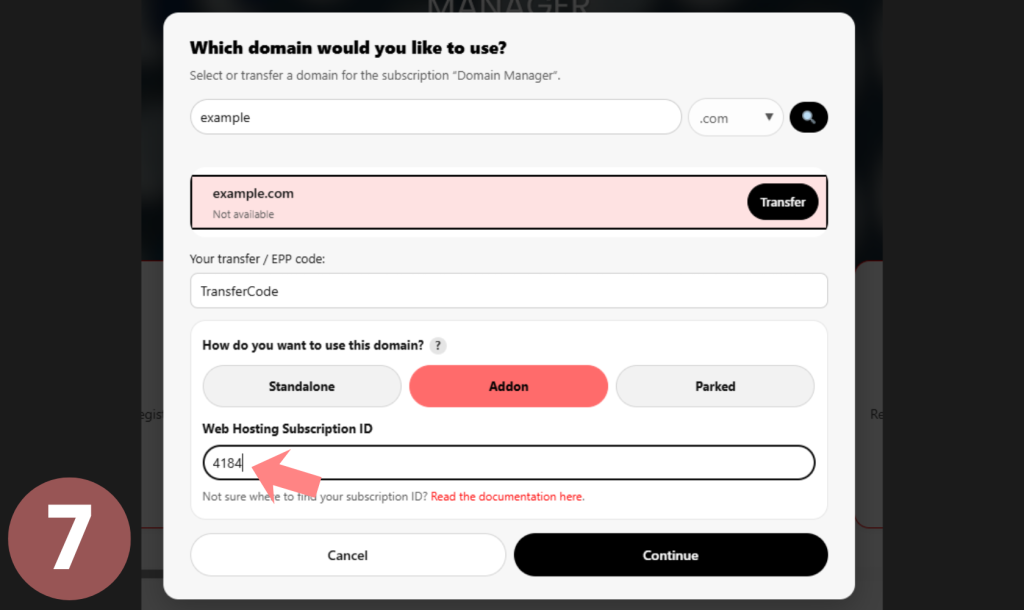
When choosing Addon Domain or Parked Domain, you must enter the Subscription ID of the web/site hosting subscription where the domain should be connected.
Follow the steps below to find your Subscription ID:
- Go to https://my.proredline.com
- Log in with your ProRedLine account if you are not already logged in.
- After logging in, stay on the My Account page and navigate to the “Orders” section.
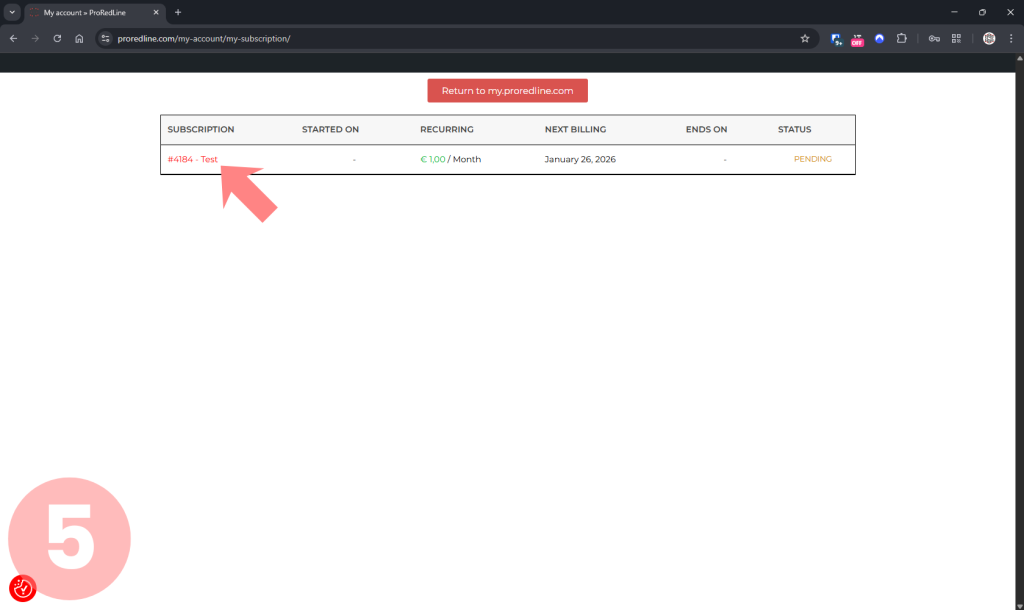
- From the available options, click “My Subscriptions”.
- You will see an overview of all subscriptions on your account.
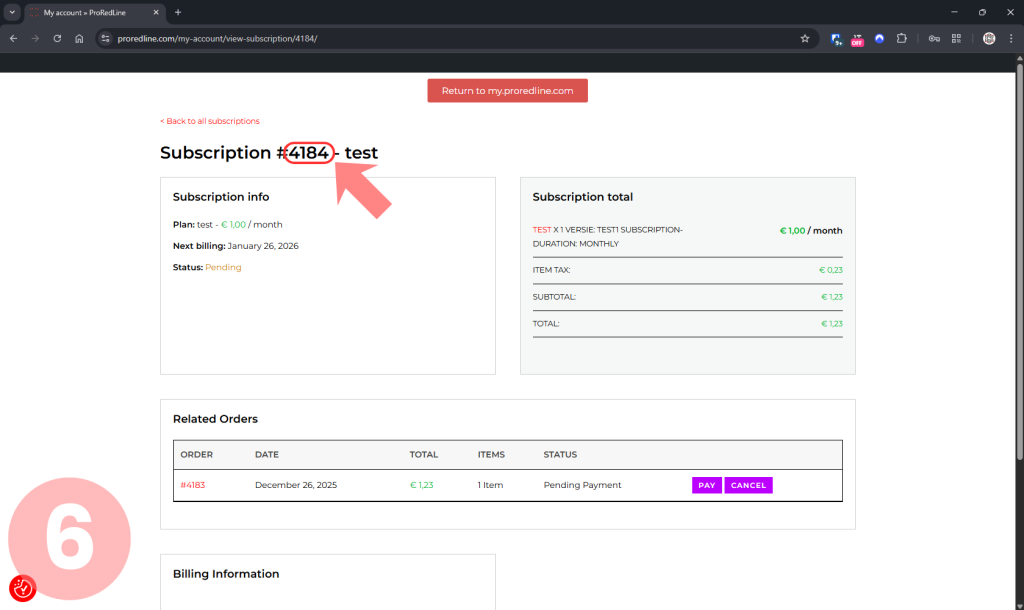
Click the subscription you want to use for the Addon or Parked domain. - At the top of the subscription page, you will see a title like:
“Subscription #1234 – Product Name”
Copy the four-digit number directly after the#. - Enter this 4-digit Subscription ID into the Parent Subscription ID field in the Domain Wizard.
Important Notes #
- Only numeric values are accepted (4 digits).
- The Subscription ID is not the order number or invoice number.
- Make sure you select the correct existing hosting subscription.\
Screenshots Subscription ID #
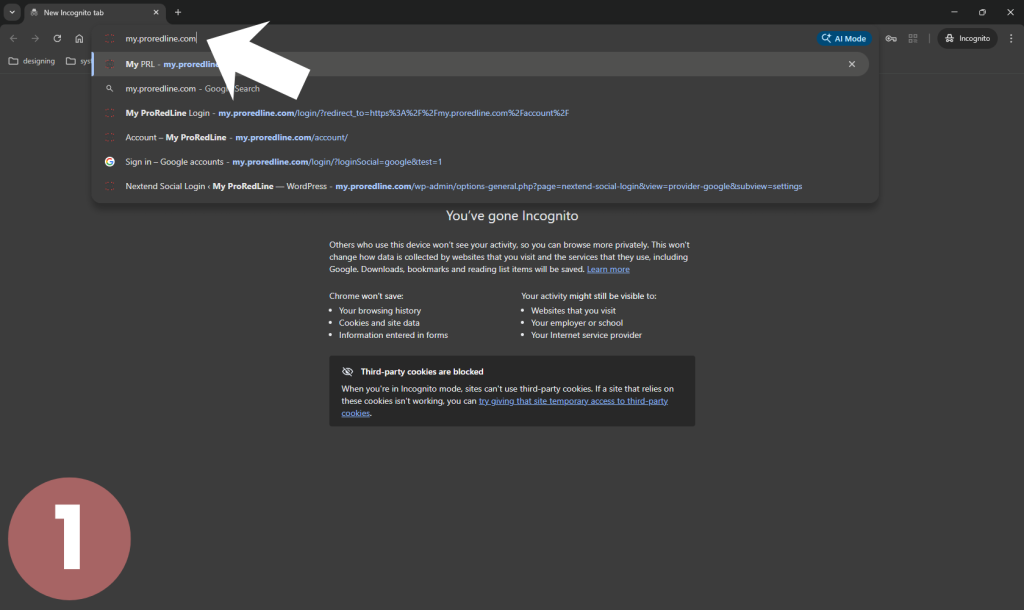
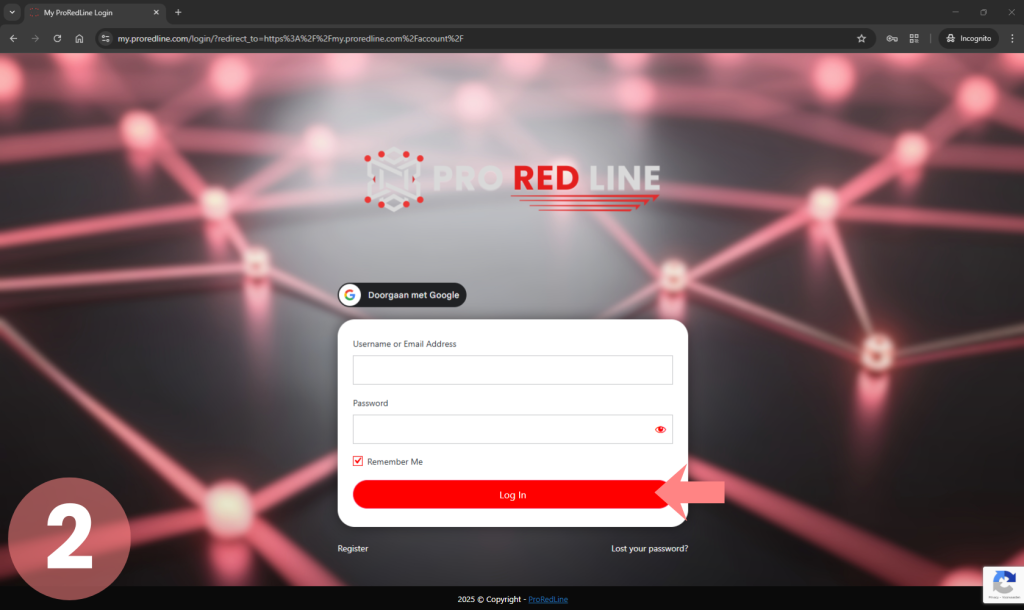
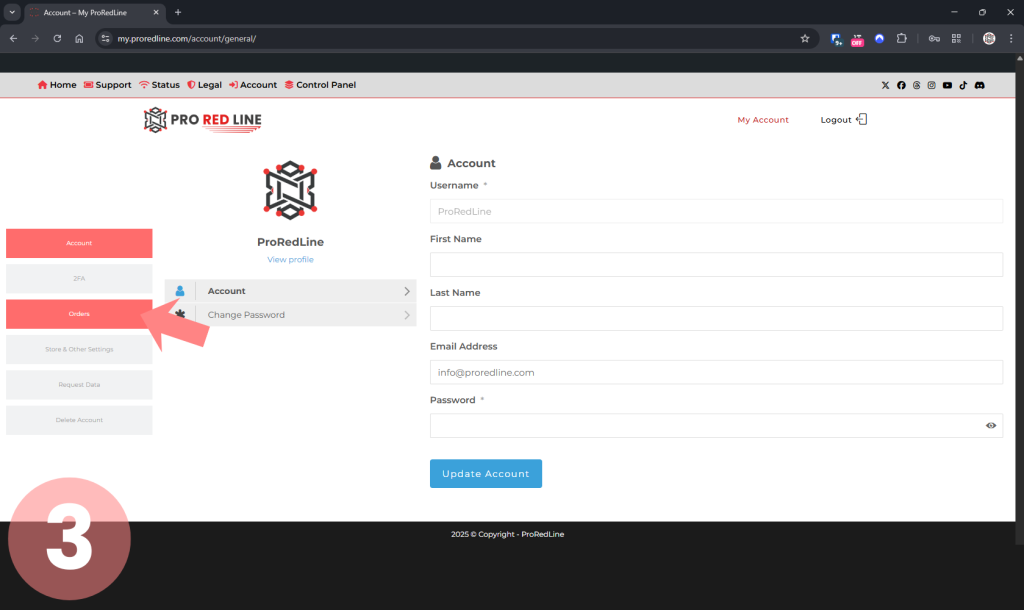
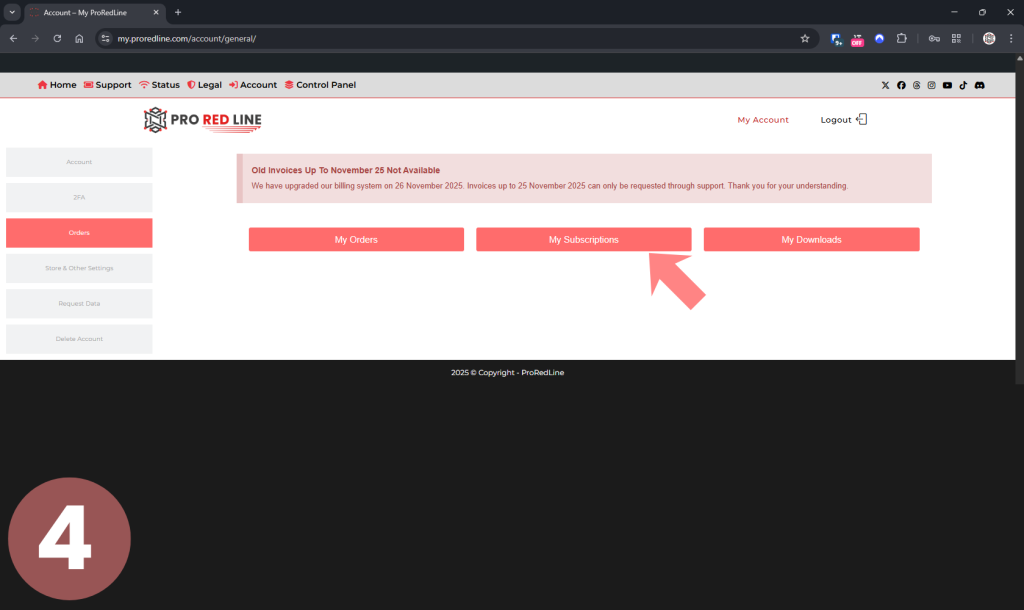
Important Notes About Billing & Contracts #
- Domain Manager is always a separate subscription
- Web Hosting and Domain Manager are two different contracts
- Cancelling your web hosting/email hosting/site hosting does not cancel separate domains
- Your domain remains active until the end of its billing period
If your hosting subscription ends:
- Parked or Addon domains may be converted to Standalone
- Your domain and DNS remain under your control
Changing Domain Usage After Purchase #
If you want to change how a domain is used:
- From standalone to parked or addon
- From parked to addon
- From addon to standalone
This can be done without additional costs.
However:
- Changes are handled manually by ProRedLine support
- You must contact support to request the change
Self-service changes are not available.
Why Support Is Required for Changes #
Support involvement ensures:
- Correct document root configuration
- No data loss
- DNS consistency
- Package limits are respected
This prevents accidental downtime.
Why This System Exists #
This approach ensures:
- Clear billing and legal separation
- Maximum flexibility
- No hidden dependencies between services
- Easy recovery if hosting is cancelled or migrated
It also prevents issues where domains would otherwise be locked to hosting subscriptions.
Need Help Choosing? #
If you are unsure which option fits your situation:
- Choose Standalone if you only want an Domain with DNS access
- Choose Parked if the domain should show an existing website
- Choose Addon if you want a new, separate website on an existing subscription
If you still have questions, our support team is happy to help.
Important Notes and Limitations #
- Domain usage depends on your hosting package
- Not all packages allow addon domains
- Changes may require DNS propagation
- Website files may need to be moved when switching usage
Support will inform you if additional steps are required.
Responsibility Notice #
You are responsible for:
- Selecting the correct domain usage during purchase
- Contacting support if changes are needed
- Understanding package limitations
ProRedLine does not automatically change domain usage without request.
Still need help after reading this article?
